
AF-002 / ManeFrame Pink
One appointment. Connected from arrival to pickup.
A grooming workflow that connects household owners, individual dogs, appointments, paperwork, visit progress, and customer conversations.
I built this for my wife Kate’s business, Pinkie’s Pooch Parlor. Barkline is the messaging side of the system.
See how it worksThe connected workflow
- Appointment
- Paperwork
- Grooming
- Notification
- Conversation
- Pickup
An appointment is more than a calendar entry
One owner may bring several dogs, each with its own visit history and paperwork. During the groom, Kate also needs to keep track of progress, communicate with the owner, and coordinate pickup.
I built the system around a simple question: What does Kate need to know or do next for this appointment?
What I built
I connected owners, dogs, appointments, paperwork, and visits while keeping the important differences. One household can have several dogs, and each dog keeps its own visit details.
I built Barkline into that same system so customer conversations and message status have a place alongside the appointment.
Follow one appointment through the system
Follow the workflow from appointment to pickup. These are real screens and existing records from September 25, 2026, with private details removed.
- 01
Appointment → the household and its dogs
Start with the owner and their dogs. Each dog has its own record, connected to the household and the right appointment. The booking also keeps a reference to its calendar event.
- 02
Paperwork → the right visit
Paperwork stays with the visit. Kate can see whether it’s still needed and open the paperwork from there.
- 03
Grooming progress → what’s next?
Check-in, bath, grooming, nails, ready, and picked up each have a place in the visit. The example below shows the recorded times for a completed visit.
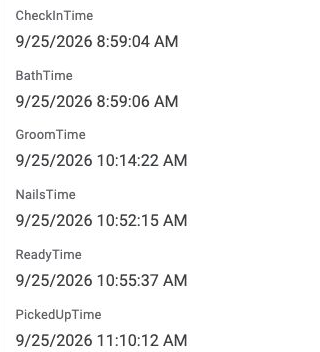
Where is this dog in the visit? Recorded milestones keep progress and pickup together. The crop excludes the customer, pet, photos, and financial details. View full size ↗ - 04
Customer notification → did it get there?
Each notification keeps its type, time, and delivery status with the visit. In this example, the confirmation and almost-ready messages are marked Delivered.
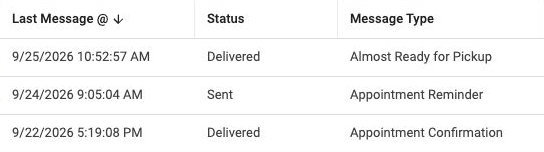
What happened to the notification? This existing visit history distinguishes Sent from Delivered. The history shown belongs to an existing visit. View full size ↗ - 05
Reply in Barkline → the customer’s conversation
Barkline is the communication workspace inside ManeFrame Pink. Inbox, conversations, message history, and queue appear together. Message and conversation records retain customer and visit references so a reply can stay connected to its context.
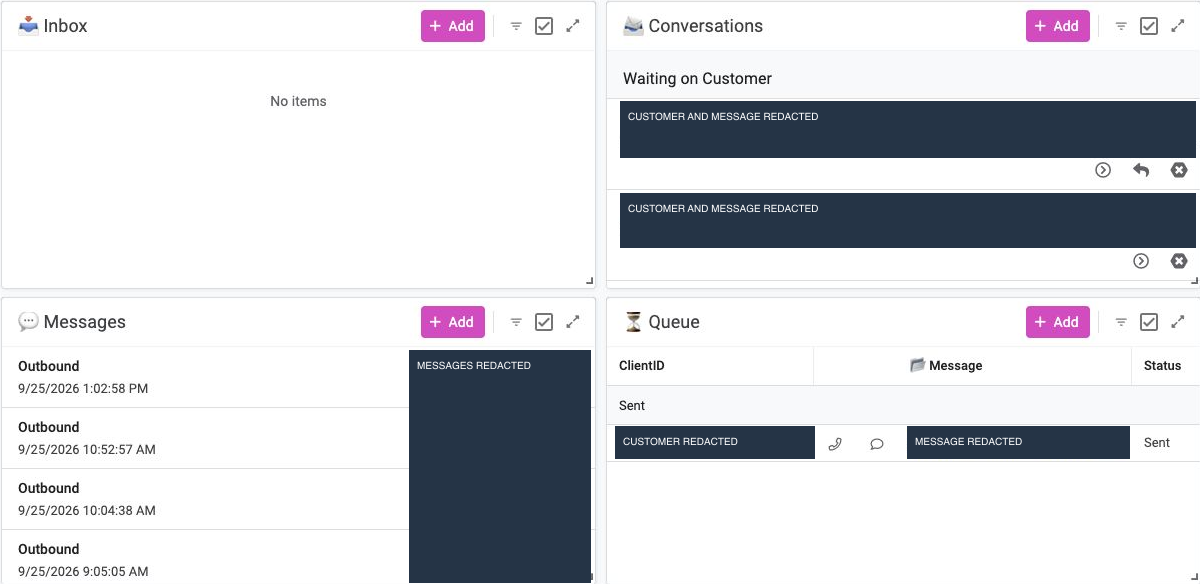
Where does customer communication belong? Barkline brings conversation state and outgoing message status into one workspace. Customer identities and all message text are permanently redacted. View full size ↗ - 06
Pickup → the visit’s final milestone
A pickup timestamp records the final handoff alongside the earlier grooming stages. The appointment’s operational story can be followed from the booking and paperwork records through progress, communication, and pickup.
The everyday impact
What changed for Kate
Kate runs her own grooming business, Pinkie’s Pooch Parlor. ManeFrame Pink supports the day-to-day work behind that business: appointments, paperwork, grooming progress, and conversations with customers.
I built it so she can follow an appointment from check-in to pickup, update its progress, and find the customer’s conversation in the same system.
“if the goal was reducing my waiting time, then I think we are there.”
That’s what I wanted this to do: make the business easier for her to run.
My part
I designed and built the connections between household and pet records, appointments, paperwork, the calendar, and customer messages for Kate’s business.
I designed Barkline as part of that appointment workflow, with conversation context and message status available inside the application.
How it’s built Tools and my contribution
AppSheet supplies the application interface and Google Sheets holds the related records. The automation source includes Apps Script functions for calendar synchronization, paperwork matching, SMS queues, pickup-readiness checks, and delivery-status callbacks. Twilio supplies SMS transport.
My work connects what happens during an appointment to those tools.
Have something like this in mind?
Where does information get lost in your business?
Tell me what you keep chasing down, entering twice, or stopping work to sort out.
Let’s talk